Choosing a medicine reminder app without ads
An ad-free label can make a routine feel calmer, but it is only one part of choosing a medicine reminder. The useful question is whether the app can help you build, check and follow a plan without asking it to make medical decisions for you.
1. Choose a setup method you will actually use
Some people have one medicine and know the details. Others receive a prescription with several medicines and times. Look for a reminder app that gives you an appropriate starting point: manual entry for control, and a photo-assisted option only if it still lets you check the result.
NextDose supports both. You can add a prescription photo or enter medicines manually. A photo can prepare a draft; it is not a substitute for reading the written instructions.
2. Make sure nothing starts without your review
For medicine reminders, the important safety check is whether you can inspect a medicine name, dose, frequency, reminder time and end date before the plan becomes active. You should be able to correct a row, delete it, or stop and ask a pharmacist if an instruction is unclear.
In NextDose, reminders start only after you review and confirm the plan. That does not guarantee an interpretation is correct; it keeps the final choice with you.
3. Look for a daily plan you can understand at a glance
A useful reminder screen shows what is due, what you marked taken and what comes next. A record is not proof that you took a dose, but it can help you avoid relying on memory alone. Look for a clear undo path in case you mark something by accident.
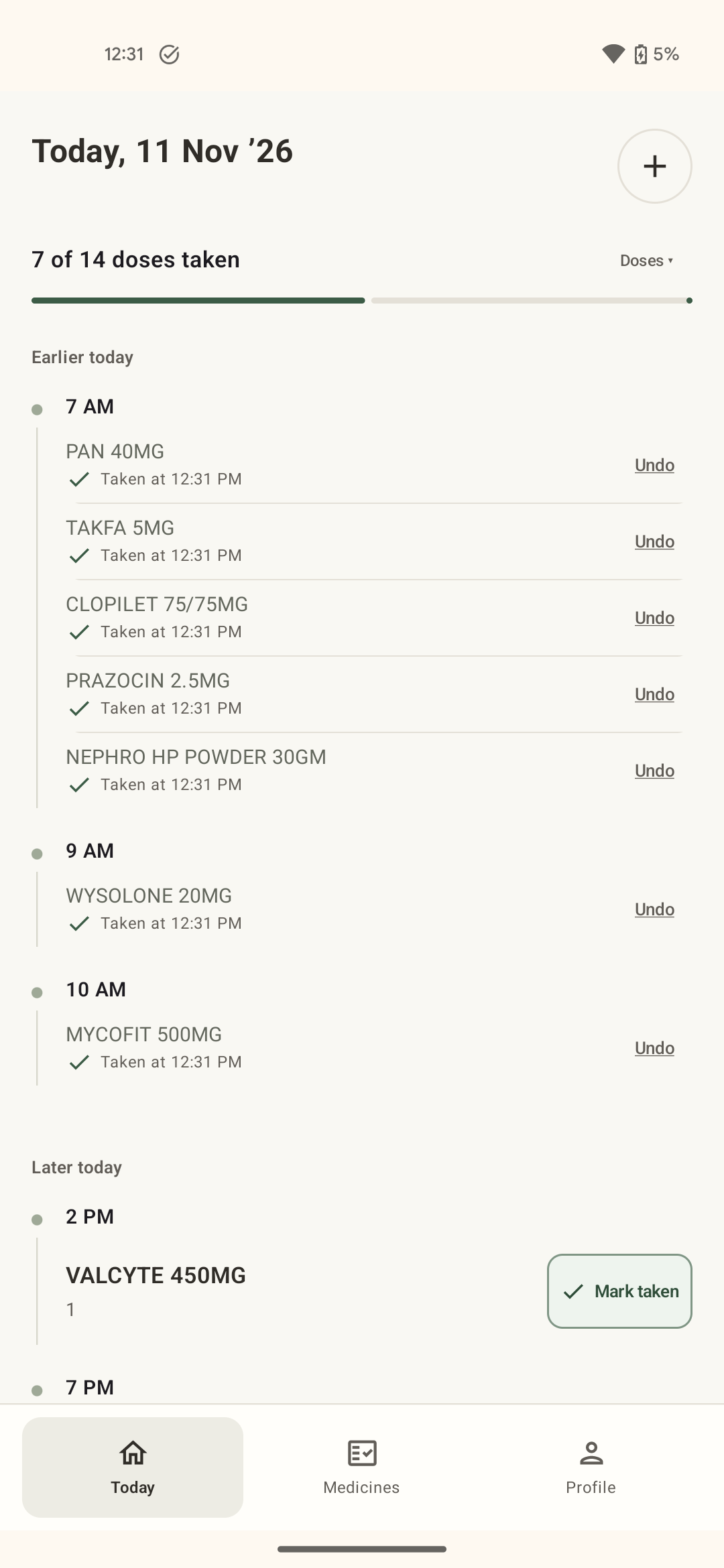
4. Check that it fits your schedule
Before committing, make sure the app can represent the schedule you were given. NextDose supports multiple daily times, weekly and alternate-day schedules, and end dates for limited courses. It also allows as-needed medicines without timed reminders; it does not decide when an as-needed dose is appropriate.
Any Android medicine reminder also depends on the device permissions it requests and the way the phone handles alerts. Complete the notification and alarm-access prompts, then check your confirmed plan in the app.
5. Check the data and the limits, not just the ads
Before choosing a health app, read its current store listing and privacy policy. In particular, check whether an account is required, how a prescription photo is processed, and whether you can use manual entry instead.
NextDose is an ad-free Android app that requires Google sign-in. When you choose the photo-reading feature, the information you submit is processed by NextDose’s service and Google Gemini to prepare a draft. Technical and usage data may be handled as described in the NextDose Privacy Policy. You can enter medicines manually instead of using the photo-reading feature.
Nuviro Labs makes NextDose, so this page is not an independent ranking or a claim that NextDose is right for everyone. It is a practical checklist for choosing a reminder tool. The app does not provide medical advice or decide what you should take.
Review first. Then let reminders do the remembering.
Use a photo or manual entry, confirm the details and see your plan in one daily view.
Get NextDose on Google Play (opens in a new tab)