How to check whether you took your medicine
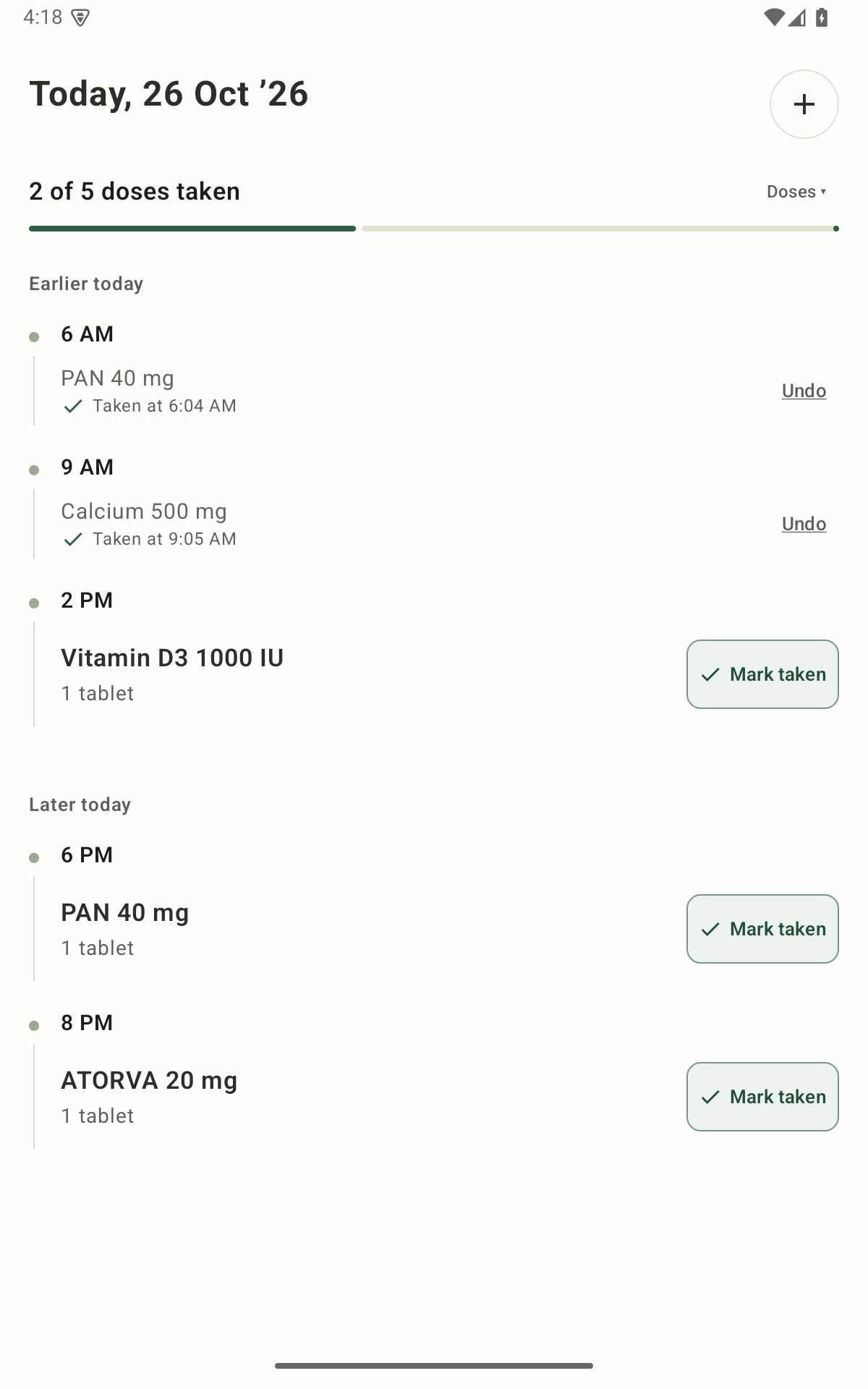
Open Today in NextDose and find the medicine and scheduled time. A Taken entry shows that you recorded the dose, including when you recorded it. An empty entry does not prove you missed it, and a dismissed or snoozed alarm does not prove you took it.
Check the record before relying on memory
Find the exact medicine and time
Open Today and match both the medicine and its scheduled occurrence. A morning record is not evidence that an evening dose was taken.
Read the saved state
Look for Taken at and the recorded time. The app records your action; it cannot observe whether you physically took the medicine.
Leave uncertainty visible
If there is no Taken record and you do not remember, do not fill the gap with a guess. Ask your pharmacist or prescriber what to do about the uncertainty.
Taken, Snooze and Skip mean different things
- Taken / I took it
- Use this after taking the dose. It saves a Taken record for that occurrence. If you tap it accidentally, use Undo rather than leaving an incorrect record.
- Snooze / Remind in 10 min
- Requests a later alert when that action is available. It is not a Taken record, a clinical instruction to delay a medicine, or a change to the prescription.
- Skip
- The current verified NextDose version does not offer a separate Skip record. Leaving a dose unrecorded or dismissing an alert does not create a documented Skipped state.
For a single-medicine notification, the current labels are I took it and Remind in 10 min. Open grouped reminders to review the individual medicines. Do not mark the whole routine complete because you responded to one alert.
Make the log useful next time
Record the action as close as practical to taking the medicine, after you have taken it. If you record it later, remember that the saved action time may be later than the actual intake. Avoid marking Taken merely to silence an alarm.
For example, if two medicines share a reminder time and you have taken only one, record only that one. The other entry should still reflect what you know.
Today is the place to check your daily record in the current version. It is your record of the actions you logged, rather than an independent check of an intake.
If you still cannot tell whether you took it
A medicine log helps only when its entries are accurate. A missing entry can mean you did not take the dose, or that you took it without recording it. A Taken entry can also be wrong if it was tapped by mistake.
This page cannot tell you whether to take another dose, skip a dose or change the next one. Check the medicine’s instructions and contact your pharmacist or prescriber for guidance about your situation. Do not use the absence of a checkmark as a dosing decision.
If the underlying reminder plan is out of date, use the schedule-change workflow to bring the app back into line with the instructions you have been given.
Start with the plan you already have.
Add your medicines, check the details and confirm your daily reminders.
Get NextDose on Google Play (opens in a new tab)